How 1Password Watchtower Protects Your Accounts

In today’s digital landscape, keeping your personal information safe can feel like a full-time job. With data breaches hitting major corporations, e-commerce platforms, and social media networks on a regular basis, the old ways of managing passwords simply do not cut it anymore. Writing credentials down in a notebook, memorizing variations of the same weak password, or using the same phrase across multiple websites leaves a massive target on your digital footprint.
Fortunately, modern cybersecurity tools have evolved to handle these heavy lifting tasks for you. One of the most effective and user-friendly features built into modern password management systems is 1Password Watchtower.
If you have ever wondered how to stay steps ahead of hackers without needing a degree in computer science, understanding how this feature operates is a game-changer. In this comprehensive guide, we will break down what Watchtower is, how it works behind the scenes, and how you can use it to bulletproof your online accounts.
What Is 1Password Watchtower and How Does It Work?
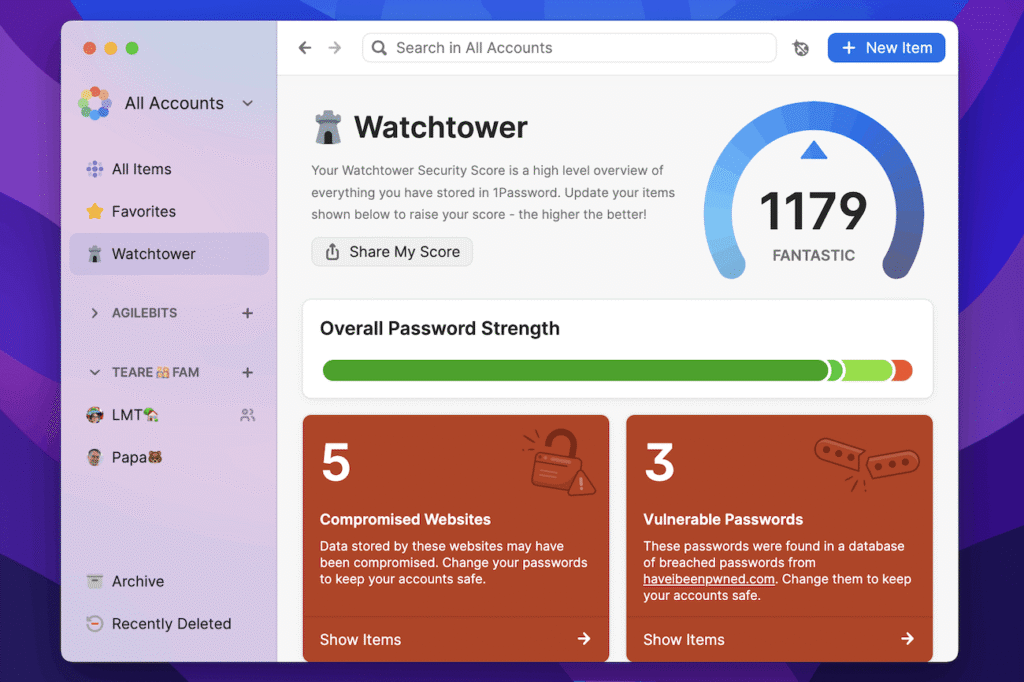
At its core, 1Password Watchtower acts as your personal digital security guard. It is an intelligent auditing and monitoring feature built directly into the 1Password ecosystem.Instead of requiring you to manually check every single website you use for security updates, Watchtower constantly scans your stored credentials and cross-references them against known vulnerabilities, global data breaches, and security best practices.
Think of it as an automated dashboard for your digital health. Every time you open your vault, Watchtower evaluates your items and organizes them into clear, actionable categories. If a website you use suffers a security compromise, if a password you rely on is too weak, or if you are reusing the exact same combination on three different banking and shopping portals, Watchtower immediately flags the issue and gives you clear instructions on how to fix it.
The best part? It achieves all of this without compromising your privacy. Through clever cryptographic techniques—such as checking leaked password databases via secure hashing methods—your actual master password and private credentials never leave your device. You get total peace of mind knowing your data stays entirely encrypted and confidential.
Real-Time Data Breach Monitoring and Compromised Password Alerts
One of the most dangerous threats to online security is the massive data breach. When hackers infiltrate a database, they often leak millions of usernames, email addresses, and associated passwords onto the dark web. If you use that same password anywhere else, cybercriminals can easily break into your other profiles through automated credential-stuffing attacks.
Watchtower protects you by integrating directly with trusted intelligence services, such as Troy Hunt’s renowned Have I Been Pwned database.
- Proactive Scanning:It checks your saved passwords against hundreds of millions of exposed credentials.
- Instant Warnings:If a match is found, Watchtower displays a bright, hard-to-miss alert banner across the affected item.
- Detailed Insights:It tells you precisely which website was compromised, when the breach happened, and what type of data might have been exposed.
Armed with this information, you can instantly log into the vulnerable site, use the built-in password generator to create a brand-new, unguessable string, and secure your account before malicious actors can exploit it.
Identifying Weak and Reused Passwords Before Hackers Strike
Human psychology tends to favor convenience over complexity. Because of this, millions of internet users rely on predictable patterns—like substituting a number for a letter, adding a birth year, or reusing a favorite phrase across dozens of different logins. Hackers know this, and they use lightning-fast algorithms to crack these weak combinations in seconds.
Watchtower eliminates this vulnerability by auditing your entire vault for two major habits:
- Weak Passwords:It flags accounts protected by short sequences, common dictionary words, or patterns that are easy to guess.
- Reused Passwords:It groups accounts that share identical passwords, showing you exactly how widespread a single security lapse could be.
When Watchtower highlights these risks, it encourages a shift toward high-entropy, completely randomized passwords. Because 1Password remembers and autofills these complex combinations for you, you never have to memorize a 20-character string of random letters, numbers, and symbols.
Closing Security Gaps with Two-Factor Authentication (2FA) Reminders
A strong password is a fantastic first line of defense, but adding a second layer makes your accounts virtually impenetrable. Two-factor authentication (2FA) requires you to provide a secondary piece of evidence—such as a temporary code from an authenticator app—alongside your password.
Many major websites support 2FA, but users often fail to turn it on simply because it requires a few extra setup steps.Watchtower solves this friction by scanning your saved logins and identifying which websites support 2FA but lack an active one-time password in your vault.
- Convenient Prompts: Watchtower gives you a dedicated list of sites where you can instantly upgrade your security.
- Built-In Authenticator:1Password can even store and generate your 2FA verification codes directly, meaning you don’t necessarily have to juggle multiple separate apps on your phone to get your login codes.
Detecting Unsecured Websites and HTTP Risks
When you browse the web, you expect your connection to be encrypted. Websites that utilize standard HTTP instead of secure HTTPS transmit information in plain text. If you type a password into an unsecured HTTP site while connected to public Wi-Fi at a coffee shop or airport, anyone monitoring network traffic could intercept your credentials.
Watchtower acts as a web hygiene supervisor by detecting when you have saved a login URL starting with http:// for a website that is widely known to support secure https:// encryption. With a single click on the alert banner, Watchtower allows you to update your saved URL to the secure version, ensuring that all future data transfers between your browser and the website remain safely encrypted.
Embracing Modern Security: Passkeys and Expiry Tracking
As technology moves forward, security measures continue to adapt. Passkeys are rapidly replacing traditional passwords by utilizing biometric verification (such as fingerprint or facial recognition) or device pins to log you into websites safely, eliminating phishing risks entirely.Watchtower features a dedicated Passkeys Available category that highlights which of your accounts support passkeys, helping you transition to passwordless login methods smoothly.
Additionally, Watchtower monitors items with expiration dates. Whether it is a credit card, a driver’s license, a passport, or secure developer credentials, Watchtower sends out timely reminders before these items expire, preventing sudden service interruptions or account lockouts.
Best Practices to Maximize Your Digital Safety with Watchtower
To get the absolute most out of 1Password Watchtower, consistency and proactive maintenance are key. Follow these simple rules to keep your digital life secure:
- Centralize Your Vault: Watchtower can only protect accounts that are actually saved inside your password manager. Make sure every single online account—from banking and streaming to utility portals and online shopping—is stored in your vault.
- Check the Dashboard Regularly: Make it a habit to open your Watchtower report once a month. Treat it like routine maintenance, much like checking the oil in your car.
- Act on Alerts Immediately:If Watchtower flags a compromised password or a data breach involving one of your emails, do not wait.Update the credential right away using the generator tool.
- Enable Browser Extensions: Install the official 1Password browser extension so Watchtower can warn you in real-time if you attempt to sign into a site that has an active security breach.
By letting Watchtower handle the complex monitoring behind the scenes, you can navigate the internet with total confidence, knowing that your digital identity is guarded by state-of-the-art automated intelligence.